Penguin rocket-building sim that rewards experimental launches
Learn to Fly 3, from Light Bringer Games, casts the player as a determined penguin trying to break free from Earth's lower air. The game centers on designing and launching vertical rockets, requiring careful balance of thrust, mass, and fuel across stages. It pairs ship customization, persistent research upgrades, a progression loop, and cosmetic options. Fans of physics-driven simulation, short retryable sessions, and followers of the original browser series are the intended audience.
What kind of game is Learn to Fly 3?
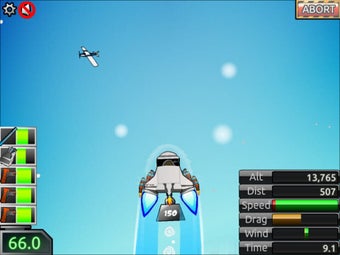
So, the title is a physics-based launch simulator that pushes a familiar arcade impulse toward mechanical problem solving. The core loop places emphasis on constructing a craft and sending it through staged flight to reach the moon, with success hinging on how well thrust, weight, and fuel interact. Thus, play alternates between creative assembly and iterative test launches rather than pure reflex-based action.
How do modes and mechanics change the experience?
The game separates play into four distinct modes: Story, Payload, Classic, and Sandbox, each shifting the objective and constraints. Ship construction uses parts that can be mixed across bodies, stages, launchers, and boosts, inviting experimentation with multi-stage designs. A research and upgrade system persists across sessions, turning incremental earnings into permanent enhancements and new mechanical options for subsequent runs.
What does the game look and feel like?
Players encounter a lighthearted 'penguins in space' tone, with visible customization for HUD elements, character appearance, and ship colors that personalize the experience. Visuals lean toward stylized, accessible presentation rather than photorealism, matching the game's mix of physics accuracy and arcade pacing. Interface customization helps players expose the metrics they care about while testing unconventional assemblies.
Is the progression satisfying and replayable?
Progression rewards repeated attempts through currency, Bonus Points, and research unlocks that carry forward between flights. The title includes a large achievement suite, with over eighty in-game goals and a subset on the desktop storefront, which encourages goal-oriented play. Sandbox mode and the multiplicity of parts extend replay value by letting players try out experimental builds without standard mission constraints.
Learn to Fly 3 is a solid match for tinkering-focused players
Given its Very Positive reception on the desktop storefront and explicit support for lower-spec machines, the game is accessible to a broad set of setups and tastes. It best rewards players who enjoy gradual mechanical refinement and repeated tests; those seeking instant arcade thrills should note the deliberate, experimental pacing. The title stands as a practical, nostalgic evolution of the original browser series.